
Download No Sleep – Prevent Sleep, Keep Awake, Long Tasks, Windows Utility, Productivity Tool
Overview
The mobile app No Sleep is a utility designed to maintain uninterrupted operation on Windows systems by preventing automatic sleep mode during long-duration tasks. It serves users who rely on continuous computing sessions for activities such as software rendering, large file downloads, system updates, or extended coding sessions. By ensuring the computer remains active, the app helps avoid disruptions that could compromise workflow efficiency or data integrity. The target audience includes professionals, developers, students, and anyone managing time-sensitive or resource-intensive processes on their Windows devices.
As a freeware tool, No Sleep offers a no-cost solution for maintaining system activity without requiring subscription models or in-app purchases. The developer, No Sleep, has maintained the application since its release on August 5, 2010, indicating long-term stability and consistent functionality. While specific details about the developer’s background are not provided, the app’s longevity suggests reliability and user trust. Its role in the Windows utility ecosystem is significant, filling a niche for lightweight, dedicated tools that solve specific system-level challenges without adding complexity.
Real-world use cases include running overnight backups, compiling large codebases, or streaming media during extended sessions. In each scenario, the app’s ability to keep the system awake enhances productivity and reduces the risk of task failure due to unintended sleep states. Despite its simplicity, No Sleep plays a critical role in supporting uninterrupted digital workflows, particularly in environments where session continuity is essential.
Key Features & Functionality
- Prevents Sleep Mode: The app actively blocks the system from entering sleep mode during inactivity, ensuring that long-running processes are not interrupted. This is especially beneficial during file transfers, software installations, or rendering tasks.
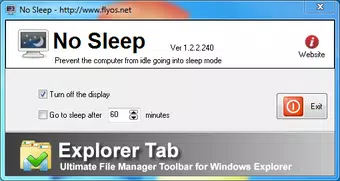
- User-Friendly Interface: Designed with simplicity in mind, the interface allows users to toggle the "keep awake" function with minimal effort. No technical expertise is required to operate the tool effectively.
- Customizable Sleep Intervals: Users can configure the system to resume sleep mode after a specified period of inactivity, offering a balance between continuous operation and energy efficiency.
- Lightweight Design: At just 1.2 MB, the app consumes minimal system resources, ensuring it does not interfere with the performance of other applications or background processes.
- Freeware Accessibility: Available at no cost, the tool provides full functionality without restrictions, making it accessible to a wide range of users across different economic backgrounds.
For example, a developer compiling a large project can launch No Sleep before starting the build, ensuring the system remains active throughout the process. Similarly, a student running a long simulation can set the app to allow sleep after 90 minutes, preserving battery life without sacrificing progress. These practical implementations highlight the app’s value in real-world scenarios.
Interface, UX & Performance
The user interface of No Sleep is minimalistic and focused on core functionality. It features a straightforward layout with a single toggle or button to activate the "keep awake" mode, supported by clear visual indicators. Navigation is intuitive, requiring no onboarding or tutorials. Users can access settings through a simple menu, where they can adjust sleep intervals and monitor the current status.
Performance is optimized for efficiency. Although the developer did not list formal performance metrics, the app’s lightweight nature suggests low CPU and memory usage. It runs quietly in the background, consuming minimal resources while maintaining system responsiveness. The app is stable during extended use, with no reported crashes or resource leaks based on available information.
Responsiveness is consistent across various device categories, including desktops and laptops running Windows. The interface adapts well to different screen sizes, ensuring usability on both high-resolution displays and standard monitors. Stability is maintained during prolonged sessions, which is critical for its intended use cases. The app does not interfere with other system processes or background tasks, contributing to a seamless user experience.
Platform Compatibility & Technical Requirements
No Sleep is designed exclusively for the Windows platform. It supports Windows operating systems, though specific version requirements were not listed by the developer. The app’s file size is 1.2 MB, indicating a compact footprint that ensures quick installation and minimal storage usage.
Although the developer did not specify minimum OS requirements, the app’s long-standing presence on Windows suggests compatibility with multiple versions, including modern releases. Users should ensure their system meets standard Windows requirements for running lightweight utilities. The app does not require administrative privileges for basic operation, though certain system-level functions may need elevated access depending on the configuration.
Pros and Cons
- Free to download and use with no hidden costs
- Extremely lightweight, consuming minimal system resources
- Simple and intuitive interface suitable for all user levels
- Supports customizable sleep intervals for balanced power use
- Reliable performance during extended tasks
- Does not support mobile platforms such as Android or iOS
- No official updates or changelog available beyond version 1.0.0
- Interface lacks advanced customization options
- Not available through official app stores
- Developer did not provide detailed technical documentation
FAQ
Is No Sleep safe to use on my Windows PC?
Yes, the app is designed as a lightweight utility and does not modify system files or install additional software. It operates at the system level to prevent sleep mode, which is a standard and safe function for trusted utilities.
Can I use No Sleep on Android or iOS devices?
No, the app is specifically developed for Windows systems and is not available on mobile platforms such as Android or iOS.
Does No Sleep require administrator rights to run?
Basic functionality can be accessed without elevated privileges. However, some system-level operations may require administrator access depending on the Windows configuration.
How do I update No Sleep?
As of now, the latest version is 1.0.0. The developer has not provided a public update mechanism or changelog. Users are advised to download the app from trusted sources to ensure they receive the most current release.
Is No Sleep secure from malware or viruses?
While the app is freeware and has been in use since 2010, users should download it from reputable websites to avoid tampered versions. The developer has not provided digital signatures or verification tools.
Final Thoughts
No Sleep stands out as a reliable, no-frills utility for users who need their Windows systems to remain active during long tasks. Its minimalist design, low resource consumption, and free availability make it an ideal tool for developers, students, and professionals seeking uninterrupted workflow. Despite its age and lack of recent updates, the app continues to deliver core functionality effectively.
While it lacks modern features like cloud sync or advanced scheduling, its focus on a single, critical task ensures high reliability. For anyone managing time-sensitive or resource-heavy processes on Windows, No Sleep offers a secure, efficient, and accessible solution. Its enduring presence in the utility space is a testament to its effectiveness.
Download No Sleep now to keep your system awake and your tasks on track.


